大家好,我是何三,独立开发者
在上一篇文章《NiceGUI:用 Python 轻松构建现代化 Web UI 的全能框架》中,我们介绍了 NiceGUI 这个强大的 Python UI 框架。今天,我们将通过一个实战案例——构建一个完整的 AI 聊天应用,来展示 NiceGUI 的真正实力。
为什么选择 NiceGUI 构建 AI Chat?
在构建 AI 对话应用时,我们通常需要考虑: - 实时流式输出:AI 回复需要逐字显示,体验更自然 - 现代化界面:聊天气泡、输入框、滚动效果等 - 响应式布局:适配不同屏幕尺寸 - 开发效率:快速迭代,不需要前后端分离
传统方案需要 React + Node.js + WebSocket,代码量动辄数百行。而用 NiceGUI,我们只需要 80 行代码就能实现完整的流式 AI 对话功能!
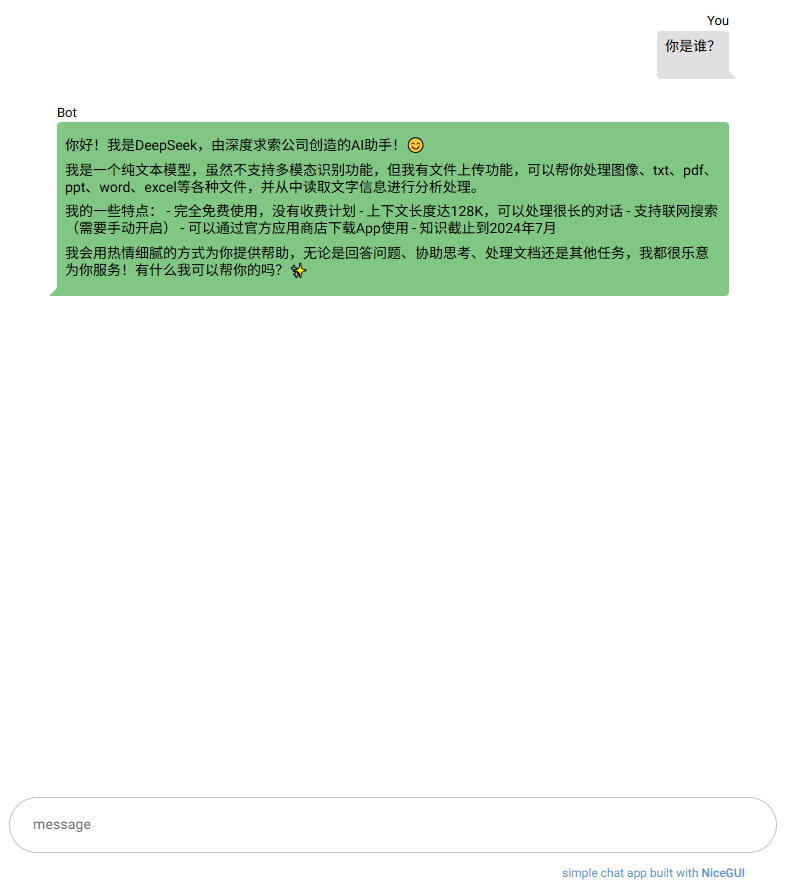
最终效果展示
先来看看实现效果: - 💬 仿微信/ChatGPT 的聊天气泡界面 - ⚡ 流式输出,逐字显示 AI 回复 - 📱 响应式设计,支持移动端 - 🎨 自动滚动到最新消息 - 🔄 Loading 动画提示
项目结构
chat-py/
├── main.py           # 核心代码(仅80行!)
├── pyproject.toml    # 项目依赖
└── .env              # API 密钥配置
快速开始
1. 安装依赖
使用 uv(推荐,极速):
uv sync
或使用 pip:
pip install nicegui langchain-openai python-dotenv
2. 配置 API
创建 .env 文件:
OPENAI_API_KEY=your-api-key-here
OPENAI_BASE_URL=https://api.deepseek.com  # 可选,使用 DeepSeek 等兼容服务
3. 运行应用
python main.py
浏览器自动打开 http://localhost:8080,即可开始对话!
核心代码解析
1. 初始化和配置
from dotenv import load_dotenv
from langchain_openai import ChatOpenAI
from nicegui import ui

# 加载环境变量
load_dotenv()

llm = ChatOpenAI(
    model="deepseek-chat",
    streaming=True,          # 关键:启用流式输出
    api_key=os.environ["OPENAI_API_KEY"],
    base_url=os.environ.get("OPENAI_BASE_URL"),
)
亮点:一行 streaming=True 就实现了流式输出,无需手动处理 WebSocket!
2. 消息容器布局
# 消息容器:自适应高度,居中显示
message_container = ui.column().classes(
    "w-full max-w-2xl mx-auto flex-grow items-stretch"
)
NiceGUI 优势:
- 使用 Tailwind CSS 类名,无需写 CSS
- flex-grow 自动占据剩余空间
- max-w-2xl 限制宽度,居中对齐
3. 发送消息逻辑
async def send() -> None:
    question = text.value
    text.value = ""  # 清空输入框

    # 添加用户消息气泡
    with message_container:
        ui.chat_message(text=question, name="You", sent=True)

        # 创建 AI 回复占位符
        response_message = ui.chat_message(name="Bot", sent=False)
        spinner = ui.spinner(type="dots")  # Loading 动画

    # 流式输出 AI 回复
    response = ""
    async for chunk in llm.astream(question):
        response += chunk.content
        with response_message.clear():
            ui.markdown(response)  # 支持 Markdown 格式
        # 自动滚动到底部
        ui.run_javascript("window.scrollTo(0, document.body.scrollHeight)")

    # 移除 Loading 动画
    message_container.remove(spinner)
关键特性:
- ui.chat_message():一行代码生成聊天气泡,sent=True 区分发送/接收
- async for:异步流式处理,不阻塞界面
- ui.markdown():自动渲染 Markdown,支持代码高亮
- ui.run_javascript():与前端 JS 交互,实现自动滚动
4. 底部输入框
with ui.footer().classes("bg-white"):
    with ui.column().classes("w-full max-w-3xl mx-auto my-6"):
        with ui.row().classes("w-full no-wrap items-center"):
            text = (
                ui.input(placeholder="message")
                .props("rounded outlined input-class=mx-3")
                .classes("w-full self-center")
                .on("keydown.enter", send)  # 回车发送
            )
设计细节:
- ui.footer():固定在底部,不会遮挡消息
- on("keydown.enter"):回车快捷发送
- rounded outlined:圆角边框风格
NiceGUI 的核心优势
通过这个项目,我们可以看到 NiceGUI 的几个突出优势:
1. 声明式 UI 编程
# 上下文管理器自动处理父子关系
with message_container:
    ui.chat_message(text="Hello", name="You")
无需手动调用 appendChild(),代码结构一目了然。
2. 内置组件库
ui.chat_message():聊天气泡ui.spinner():加载动画ui.markdown():Markdown 渲染ui.footer():底部布局
这些都是开箱即用的高质量组件!
3. 无缝前后端交互
# 后端直接调用前端 JS
ui.run_javascript("window.scrollTo(0, document.body.scrollHeight)")

# 前端事件绑定到后端函数
text.on("keydown.enter", send)
不需要写 API 接口,不需要前后端联调。
4. 异步支持
async for chunk in llm.astream(question):
    # 实时更新 UI
原生支持 async/await,处理流式数据游刃有余。
5. 极简部署
if __name__ == "__main__":
    ui.run(root, title="AI Chat")
一行命令启动,自动处理静态资源、路由、热重载。
完整代码
main.py
#!/usr/bin/env python3
"""
Chat application using NiceGUI and LangChain with OpenAI
"""

import os

from dotenv import load_dotenv
from langchain_openai import ChatOpenAI
from nicegui import ui

# Load environment variables
load_dotenv()

OPENAI_API_KEY = os.environ.get("OPENAI_API_KEY", "not-set")
OPENAI_BASE_URL = os.environ.get("OPENAI_BASE_URL", None)


def root():
    """Root component for the chat application"""

    llm = ChatOpenAI(
        model="deepseek-chat",
        streaming=True,
        api_key=OPENAI_API_KEY,
        base_url=OPENAI_BASE_URL,
    )

    async def send() -> None:
        """Send message and stream AI response"""
        question = text.value
        text.value = ""

        # Create user message and bot response placeholder
        with message_container:
            ui.chat_message(text=question, name="You", sent=True)
            response_message = ui.chat_message(name="Bot", sent=False)
            spinner = ui.spinner(type="dots")

        # Stream response from LLM
        response = ""
        async for chunk in llm.astream(question):
            response += chunk.content
            with response_message.clear():
                ui.markdown(response)
            ui.run_javascript("window.scrollTo(0, document.body.scrollHeight)")

        # Remove spinner when complete
        message_container.remove(spinner)

    # Message container
    message_container = ui.column().classes(
        "w-full max-w-2xl mx-auto flex-grow items-stretch"
    )

    ui.notify("hello")
    # Footer with input
    with (
        ui.footer().classes("bg-white"),
        ui.column().classes("w-full max-w-3xl mx-auto my-6"),
    ):
        with ui.row().classes("w-full no-wrap items-center"):
            placeholder = (
                "message"
                if OPENAI_API_KEY != "not-set"
                else "Please provide your OPENAI_API_KEY in .env file first!"
            )
            text = (
                ui.input(placeholder=placeholder)
                .props("rounded outlined input-class=mx-3")
                .classes("w-full self-center")
                .on("keydown.enter", send)
            )
        ui.markdown("simple chat app built with [NiceGUI](https://nicegui.io)").classes(
            "text-xs self-end mr-8 m-[-1em] text-primary"
        ).classes("[&_a]:text-inherit [&_a]:no-underline [&_a]:font-medium")


if __name__ in {"__main__", "__mp_main__"}:
    ui.run(root, title="deepseek chat")
部署到生产环境
方案一:Docker(推荐)
FROM python:3.10-slim
WORKDIR /app
COPY . .
RUN pip install uv && uv sync
CMD ["python", "main.py"]
EXPOSE 8080
方案二:云服务
NiceGUI 应用本质是 FastAPI,可以部署到:
- Railway:一行代码部署
- Render:免费层支持
- 自建服务器:gunicorn -w 4 main:app
扩展建议
这个基础版本可以轻松扩展:
- 添加历史记录
from nicegui import storage
messages = storage.local("messages", [])
- 多模型切换
model_select = ui.select(["GPT-4", "Claude", "DeepSeek"])
- 导出对话
ui.button("Export", on_click=lambda: ui.download(...))
- 主题切换
ui.dark_mode(True) # 一行代码切换深色模式
总结
用 NiceGUI 构建 AI Chat 应用的体验:
| 维度 | 传统方案 | NiceGUI |
|---|---|---|
| 代码量 | 500+ 行 | 80 行 |
| 技术栈 | React + Node.js + WebSocket | 纯 Python |
| 开发时间 | 2-3 天 | 30 分钟 |
| 学习曲线 | 陡峭 | 平缓 |
| 维护成本 | 高 | 低 |
NiceGUI 的哲学:让 Python 开发者专注于业务逻辑,而不是前端技术栈。对于快速原型、内部工具、AI 应用等场景,它是最优选择。
相关文档
- 🌟 NiceGUI 官方文档:https://nicegui.io
- 💻 完整代码示例:https://github.com/zauberzeug/nicegui
- 🤖 LangChain 文档:https://python.langchain.com
如果你也在寻找"一个人就能完成全栈开发"的解决方案,NiceGUI 绝对值得一试!
相关阅读: - NiceGUI:用 Python 轻松构建现代化 Web UI 的全能框架 - LangChain 实战:构建你的第一个 AI 应用
本文示例代码已开源,欢迎 Star ⭐ https://gitee.com/pojoin/chat-py.git