大家好,我是何三,独立开发者
今天要给大家介绍一个超好用的搜索引擎——Meilisearch。
为什么要用 Meilisearch?
做开发的朋友都知道,给应用加上搜索功能是刚需。但是传统的数据库搜索往往不够给力,要么慢,要么搜索结果不够准确。比如用户想搜"苹果",结果只返回了完全匹配"苹果"的记录,却漏掉了"iPhone"、"苹果手机"等相关内容。
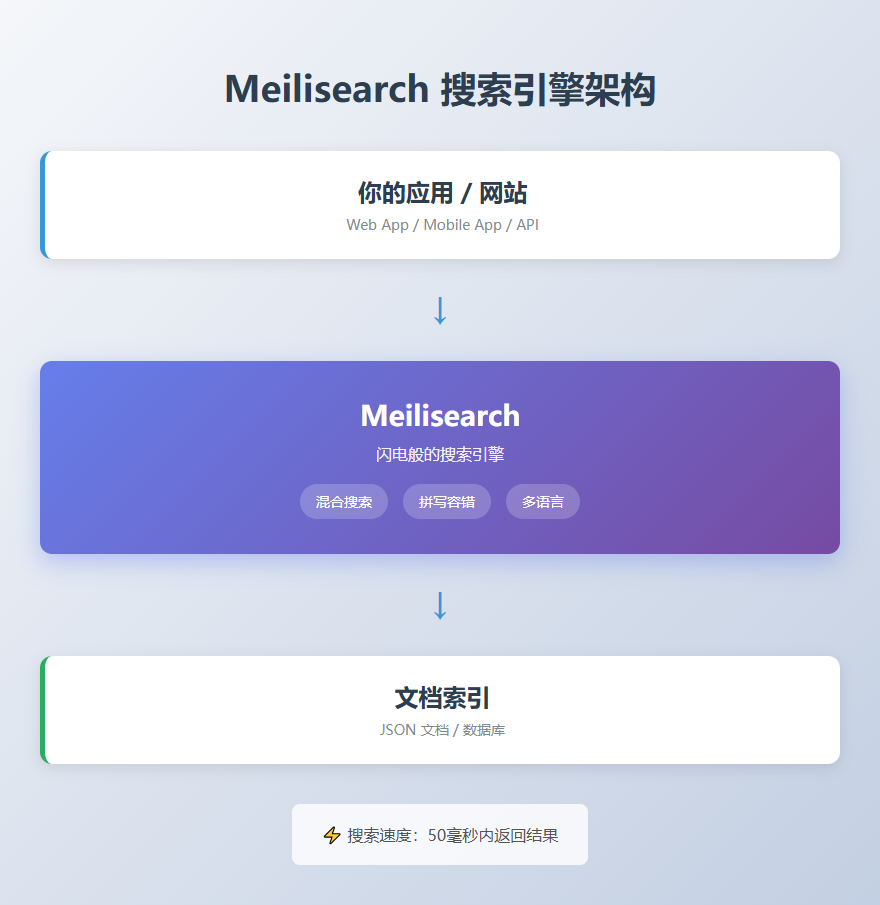
Meilisearch 就是为了解决这个问题而生的。它是一个闪电般快速的搜索引擎,专门为现代应用设计,开箱即用,上手简单,而且搜索体验超级棒。
Meilisearch 的核心特性
1. 混合搜索(Hybrid Search)
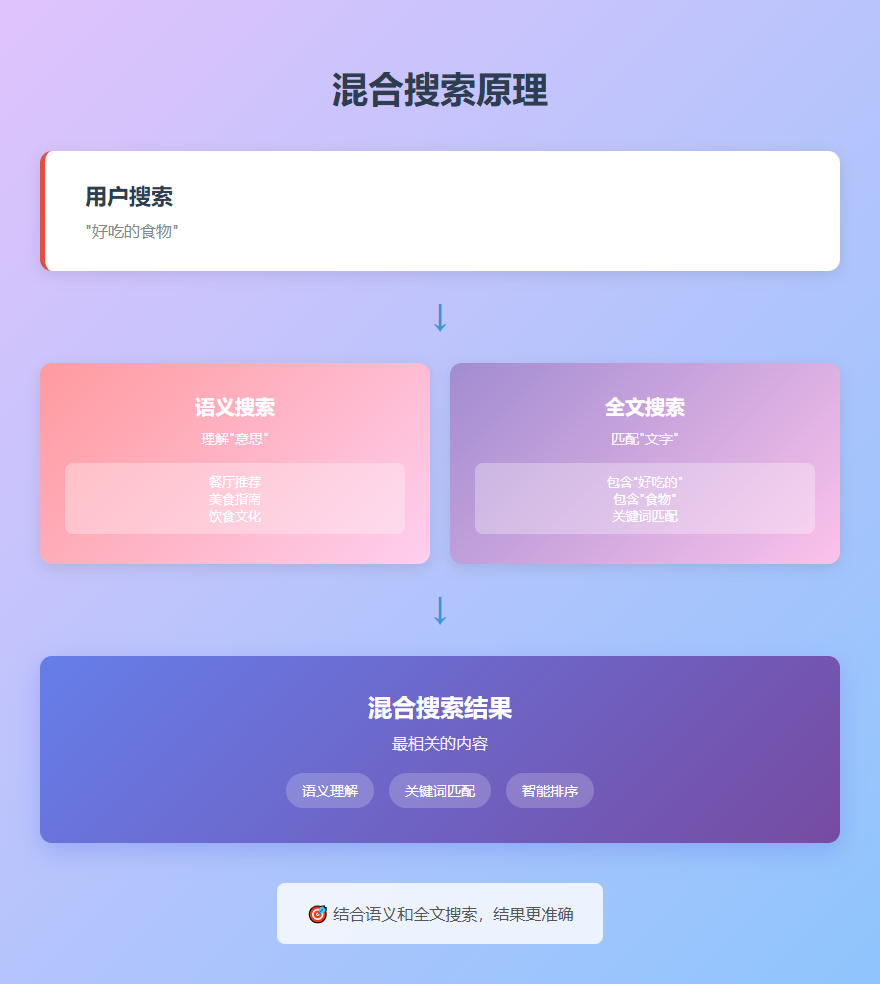
这是 Meilisearch 最强大的功能之一。它把语义搜索和全文搜索结合在一起,能给出最相关的结果。
简单来说,语义搜索能理解你搜索的"意思",而不仅仅是匹配"文字"。比如你搜"好吃的食物",它能理解你想要的是餐厅推荐,而不是字面上包含"好吃的食物"这几个字的内容。
2. 搜索即输入
Meilisearch 的搜索速度非常快,能在50毫秒内返回结果。这意味着用户每输入一个字,你都能实时展示搜索结果,体验超级流畅。
3. 拼写容错
用户打字难免会出错,Meilisearch 内置了拼写容错功能。即使搜索词里有错别字,也能返回相关结果。比如搜"iPhon",也能找到"iPhone"相关的内容。
4. 强大的过滤和排序
支持按价格、日期等各种字段排序,还能设置过滤条件,构建分面搜索界面。比如电商网站可以按价格区间、品牌、评分等维度筛选商品。
5. 多语言支持
Meilisearch 支持几乎所有语言,对中文、日语、希伯来语等还有专门优化,搜索效果特别好。
6. 安全和多租户
支持 API 密钥管理,可以精细控制用户权限。还支持多租户,可以为不同用户提供个性化的搜索结果。
7. AI-ready
开箱即支持 LangChain 和模型上下文协议(MCP),方便你把 Meilisearch 集成到 AI 应用中。

代码实战
好了,说了这么多,咱们直接上手看看怎么用。
安装 Meilisearch
首先,你需要安装 Meilisearch。最简单的方式是下载二进制文件:
# Windows
curl -L https://install.meilisearch.com | powershell

# macOS
brew install meilisearch

# Linux
curl -L https://install.meilisearch.com | sh
或者用 Docker:
docker run -it -p 7700:7700 getmeili/meilisearch:v1.5
启动后,Meilisearch 会在 http://localhost:7700 运行。
使用 Python SDK
Meilisearch 提供了多种语言的 SDK,咱们用 Python 来演示:
# 安装 Meilisearch Python SDK
# pip install meilisearch

import meilisearch
import json

# 连接到 Meilisearch
client = meilisearch.Client('http://127.0.0.1:7700')

# 创建一个索引(相当于数据库表)
index = client.create_index('movies')

# 准备一些电影数据
movies = [
    {
        'id': 1,
        'title': 'Inception',
        'description': 'A thief who steals corporate secrets through the use of dream-sharing technology',
        'genres': ['Sci-Fi', 'Action', 'Thriller'],
        'rating': 8.8
    },
    {
        'id': 2,
        'title': 'The Matrix',
        'description': 'A computer hacker learns about the true nature of reality and his role in the war against its controllers',
        'genres': ['Sci-Fi', 'Action'],
        'rating': 8.7
    },
    {
        'id': 3,
        'title': 'Interstellar',
        'description': 'A team of explorers travel through a wormhole in space in an attempt to ensure humanity\'s survival',
        'genres': ['Sci-Fi', 'Adventure', 'Drama'],
        'rating': 8.6
    }
]

# 添加文档到索引
index.add_documents(movies)

print('文档添加成功!')
基本搜索
# 搜索电影
results = index.search('dream')

print(f'找到 {len(results["hits"])} 条结果:')
for movie in results['hits']:
    print(f"- {movie['title']}: {movie['description']}")
高级搜索
# 搜索并限制返回字段
results = index.search(
    'space',
    {
        'limit': 5,
        'attributesToRetrieve': ['title', 'rating']
    }
)

# 按评分过滤
results = index.search('', {
    'filter': 'rating >= 8.7'
})

# 按类型过滤
results = index.search('', {
    'filter': 'genres IN ["Sci-Fi", "Action"]'
})

# 排序
results = index.search('', {
    'sort': ['rating:desc']
})

# 组合使用
results = index.search('action', {
    'filter': 'rating >= 8.6',
    'sort': ['rating:desc'],
    'limit': 10
})
配置搜索设置
# 配置可搜索的字段
index.update_searchable_attributes(['title', 'description'])

# 配置可过滤的字段
index.update_filterable_attributes(['rating', 'genres'])

# 配置可排序的字段
index.update_sortable_attributes(['rating'])

# 配置同义词
index.update_synonyms({
    'iphone': ['apple phone', 'apple smartphone'],
    'movie': ['film', 'picture']
})

# 配置拼写容错
index.update_typo_tolerance({
    'enabled': True,
    'minWordSizeForTypos': {
        'oneTypo': 4,
        'twoTypos': 8
    }
})
批量操作
# 批量添加文档
more_movies = [
    {'id': 4, 'title': 'Blade Runner 2049', 'description': 'Young Blade Runner K\'s discovery of a long-buried secret leads him to track down former Blade Runner Rick Deckard', 'genres': ['Sci-Fi', 'Drama'], 'rating': 8.0},
    {'id': 5, 'title': 'Ex Machina', 'description': 'A young programmer is selected to participate in a ground-breaking experiment in synthetic intelligence', 'genres': ['Sci-Fi', 'Thriller'], 'rating': 7.7}
]

index.add_documents(more_movies)

# 批量删除文档
index.delete_documents([4, 5])

# 清空索引
index.delete_all_documents()
实际应用场景
Meilisearch 适合各种需要搜索功能的应用:
- 电商网站:商品搜索、分类筛选、价格排序
- 内容平台:文章搜索、标签过滤、相关推荐
- SaaS 应用:用户搜索、数据筛选、多租户搜索
- 文档管理:全文搜索、智能匹配、拼写纠错
- 社交媒体:用户搜索、内容发现、实时搜索
总结
Meilisearch 是一个强大、快速、易用的搜索引擎,特别适合需要快速实现高质量搜索功能的应用。
核心优势: - 闪电般的搜索速度(50毫秒内) - 混合搜索,结果更准确 - 拼写容错,用户体验好 - 多语言支持,中文优化好 - 易于集成,SDK 丰富 - 开箱即用,配置简单
适用场景: - 需要实时搜索的应用 - 对搜索质量要求高的项目 - 需要多语言支持的产品 - 快速开发的 MVP 项目
如果你正在为项目添加搜索功能,不妨试试 Meilisearch,相信你会爱上它的!
推荐阅读: - Meilisearch 官方文档 :https://docs.meilisearch.com - Meilisearch GitHub:https://github.com/meilisearch/meilisearch - Meilisearch Python SDK:https://github.com/meilisearch/meilisearch-python