大家好,我是何三,独立开发者
今天要给大家介绍一个 Python 网页抓取和浏览器自动化的库——Crawlee。它是 Apify 团队开源的项目,提供了从网页抓取到数据存储的完整解决方案。
为什么要了解 Crawlee?
在数据采集和网页自动化领域,我们有很多选择:Scrapy、Selenium、Playwright、requests + BeautifulSoup 等等。每个工具都有自己的优势和适用场景。
Crawlee 的特点在于它提供了统一的抽象层,无论你使用 HTTP 请求还是真实浏览器,都能用相似的 API 编写爬虫。它还内置了很多实用功能:
- 自动重试机制:请求失败时自动重试
- 代理轮换:支持配置代理池
- 请求队列管理:自动去重和调度
- 数据持久化:支持多种存储方式
- 反爬虫绕过:默认配置就能应对常见的反爬措施
核心架构
Crawlee 的设计很清晰,核心是两个爬虫类:
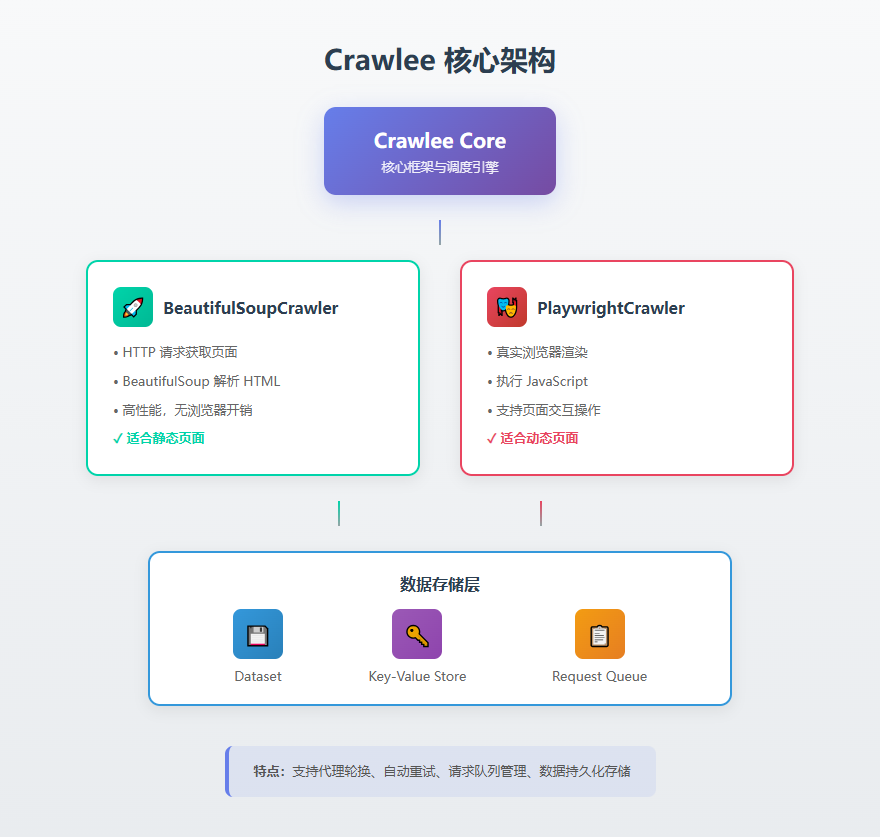
BeautifulSoupCrawler
基于 HTTPX 和 BeautifulSoup,适合抓取静态页面。它的优势是性能高、资源占用低,不需要启动浏览器。
PlaywrightCrawler
基于 Playwright,使用真实浏览器渲染页面。适合抓取依赖 JavaScript 的动态页面,或者需要模拟用户交互的场景。
两种 Crawler 对比
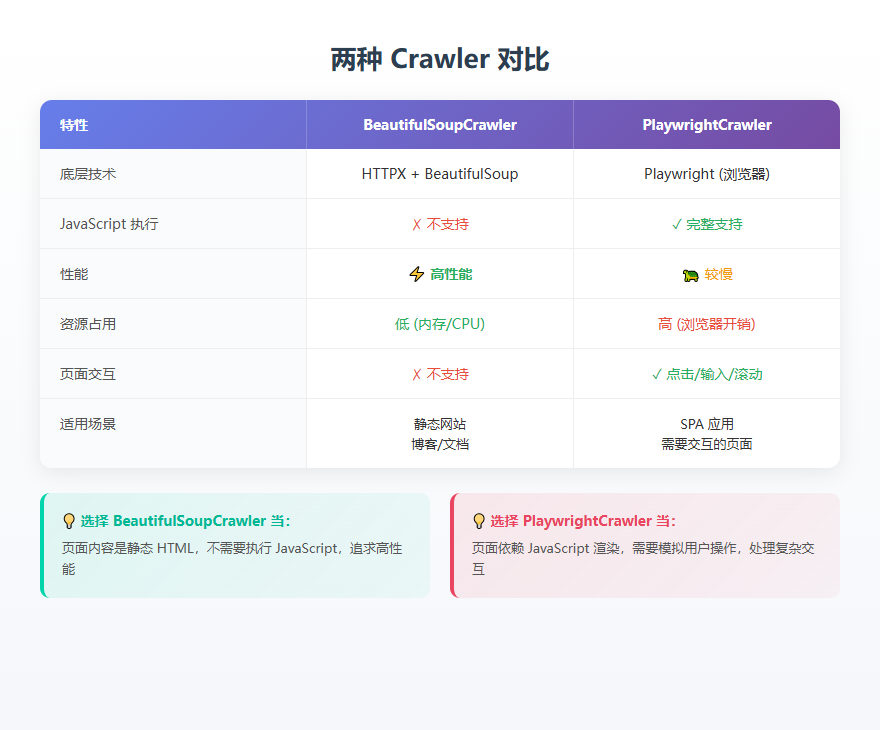
选择建议: - 如果目标页面是静态 HTML,用 BeautifulSoupCrawler - 如果页面需要 JavaScript 渲染或有复杂交互,用 PlaywrightCrawler
代码实战
安装
# 基础安装
pip install crawlee

# 安装所有功能(包含 BeautifulSoup 和 Playwright)
pip install 'crawlee[all]'

# 安装 Playwright 浏览器
playwright install
BeautifulSoupCrawler 示例
import asyncio
from crawlee.crawlers import BeautifulSoupCrawler, BeautifulSoupCrawlingContext


async def main() -> None:
    crawler = BeautifulSoupCrawler(
        max_requests_per_crawl=10,  # 限制最多抓取 10 个页面
    )

    @crawler.router.default_handler
    async def request_handler(context: BeautifulSoupCrawlingContext) -> None:
        context.log.info(f'Processing {context.request.url} ...')

        # 提取数据
        data = {
            'url': context.request.url,
            'title': context.soup.title.string if context.soup.title else None,
        }

        # 保存到数据集
        await context.push_data(data)

        # 将页面中的所有链接加入队列
        await context.enqueue_links()

    # 启动爬虫
    await crawler.run(['https://crawlee.dev'])


if __name__ == '__main__':
    asyncio.run(main())
PlaywrightCrawler 示例
import asyncio
from crawlee.crawlers import PlaywrightCrawler, PlaywrightCrawlingContext


async def main() -> None:
    crawler = PlaywrightCrawler(
        max_requests_per_crawl=10,
    )

    @crawler.router.default_handler
    async def request_handler(context: PlaywrightCrawlingContext) -> None:
        context.log.info(f'Processing {context.request.url} ...')

        # 等待特定元素加载(Playwright 的优势)
        await context.page.wait_for_selector('h1')

        # 提取数据
        data = {
            'url': context.request.url,
            'title': await context.page.title(),
        }

        # 保存数据
        await context.push_data(data)

        # 加入链接到队列
        await context.enqueue_links()

    await crawler.run(['https://crawlee.dev'])


if __name__ == '__main__':
    asyncio.run(main())
使用 Crawlee CLI 快速创建项目
Crawlee 提供了 CLI 工具,可以快速创建项目模板:
# 使用 uv 运行(推荐)
uvx 'crawlee[cli]' create my-crawler

# 或如果已安装 crawlee
crawlee create my-crawler
CLI 会引导你选择模板类型,然后自动生成项目结构和示例代码。
数据存储
Crawlee 运行后会自动创建 storage/ 目录,包含:
- datasets/:抓取的数据,默认保存为 JSON 格式
- key_value_stores/:键值对存储,适合保存配置或状态
- request_queues/:请求队列,管理待抓取的 URL
你可以通过环境变量或代码配置存储位置:
import os

# 设置存储目录
os.environ['CRAWLEE_STORAGE_DIR'] = './my_storage'
总结
Crawlee 是一个设计良好的 Python 爬虫框架,它的优势在于:
- 统一的 API:无论是 HTTP 爬虫还是浏览器爬虫,写法基本一致
- 开箱即用:内置重试、代理、队列管理等常用功能
- 可扩展性:支持自定义存储、中间件等
- TypeScript 版本:如果你也写前端,可以用同一套框架
如果你的项目需要抓取网页数据,Crawlee 值得一试。特别是当你需要同时处理静态页面和动态页面时,它提供的统一抽象能节省不少开发时间。
项目地址:https://github.com/apify/crawlee-python 官方文档:https://crawlee.dev/python